
 My own software · free
NoType: dictation that never leaves your PC
Hold a key, speak, let go. NoType writes your words wherever your cursor is: emails, chats, documents and your code editor. Speech recognition and AI run on your own computer. No subscription, no account, no cloud.
- Windows 11 (64-bit)
- Installer about 1 GB
- free, no account

How it works
Three steps, no new habit
- 01
Hold the shortcut
CtrlShiftSpaceThe overlay appears and NoType listens.
- 02
Speak naturally
While you talk, the overlay already shows what NoType has understood.
- 03
Let go
NoType transcribes at full quality, cleans the text up and inserts it wherever your cursor is. On a current NVIDIA graphics card this usually takes less than a second in my tests.
Prefer not to hold a key? Switch to “Press to start/stop” in the settings.
Why NoType
What sets it apart from cloud dictation
Completely private
Speech recognition and AI cleanup run on your own graphics card. No server, no telemetry, no account.
Free, no subscription
Install it once and use it for as long as you like. The speech models are freely available and downloaded once.
Fast
On a current NVIDIA graphics card your text usually appears in well under a second in my tests.
Any app, 99 languages
Anywhere a cursor blinks. Including German with English terms mixed in, or the other way around.
Overlay
Eight designs that react to your voice
This is the app's original overlay code, running in the same demo mode as the live preview in the settings. Four designs stay minimal, the other four are little characters that join in while you speak. Pick a design and a colour.
AMOLED BarSpectrum, live text and timer in one pill
Design
Accent colour · Mint
Every design can sit at the top, bottom or centre of your screen, with optional start and stop sounds.
Dictionary
It learns your words
Names, brands and technical terms are where dictation usually fails. With NoType you fix a wrong word once, right where you dictated it. NoType notices the correction and asks whether it should learn it. One click, and from then on the spelling is right.
- It also catches spacing and hyphen variants: “Kuber Netis”, “Kuber-Netis”, “Kubernetis”.
- Or click a word in one of your recent dictations, or add terms to the dictionary directly.
- Works with and without AI cleanup.
Message
Next week we are moving the shop to Kubernetes.
Kuber NetisKubernetes · corrected by you
Command mode
Rewrite text with your voice
Select text in any app, hold the second shortcut and say what should happen to it. The local AI rewrites your selection in place. With nothing selected, it writes new text at your cursor.
For example
- “Make this more formal”
- “Translate this to German”
- “Turn this into bullet points”
- “Write a short note declining tomorrow's meeting”
Command mode uses the local AI engine (Ollama), which you install with one click in the settings. AI cleanup itself can stay off.

Text cleanup
AI cleanup that never slows you down
Raw speech is messy: “uhm”, false starts, missing punctuation. NoType cleans it up in two steps, and you choose how far.
| Mode | What happens | Extra wait |
|---|---|---|
| Off | The raw transcript is inserted as is. | Extra wait: none |
| FastDefault | Filler words and stutters are removed instantly, and sentences start with a capital letter. | Extra wait: practically none |
| AI | After the fast pass, a small local language model fixes grammar, punctuation and small recognition errors. | Extra wait: in my tests usually 200 to 500 ms, at most 2.5 s |
You install the AI engine with one click from inside NoType, without admin rights, into the app's own folder. If the AI takes too long, or if it changes the meaning, for example by translating or answering your sentence, NoType inserts the fast version instead. You never wait on the AI.
Settings
Everything in one place
Settings in the Windows 11 look, with recommendations for your hardware and a live preview of the overlay.
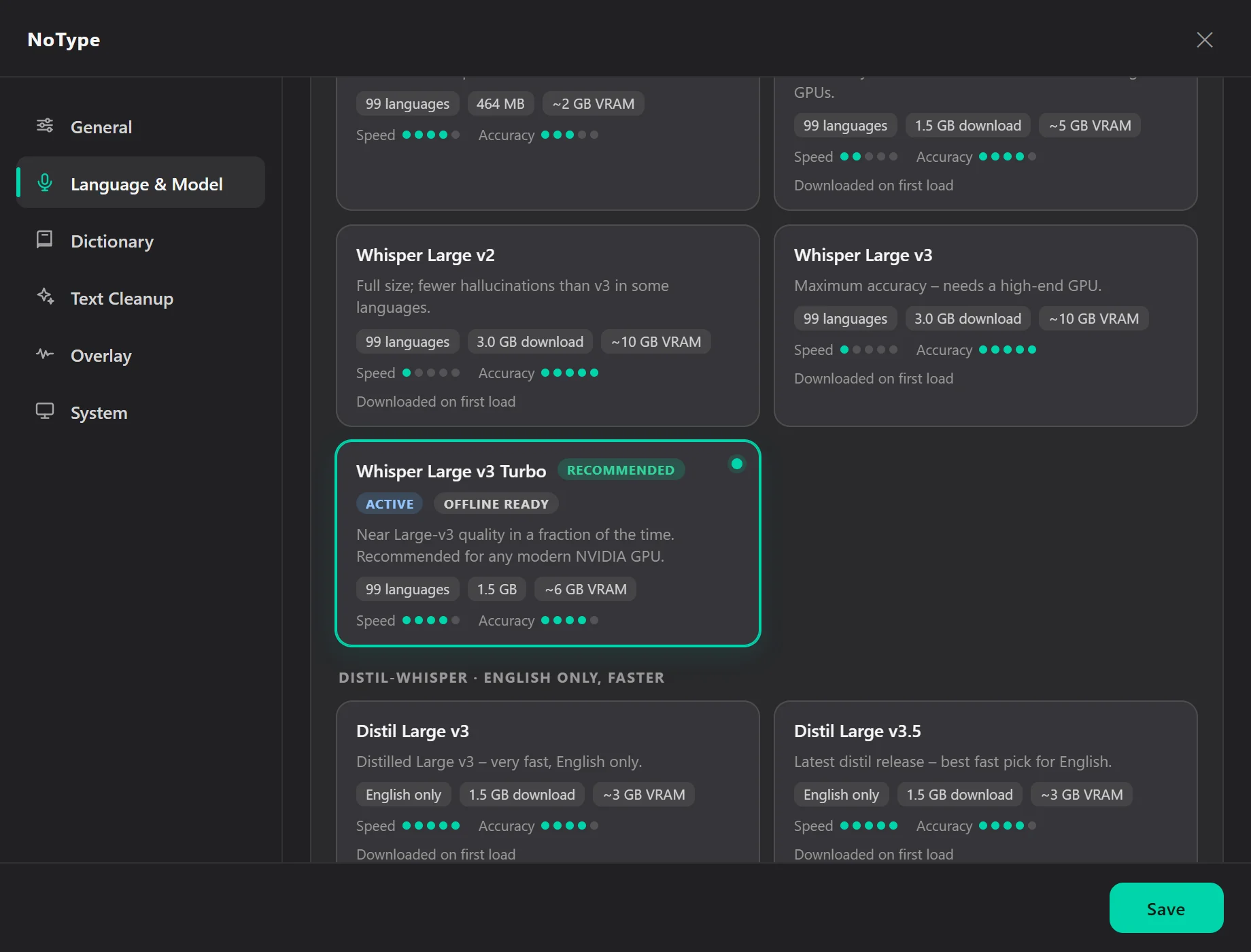
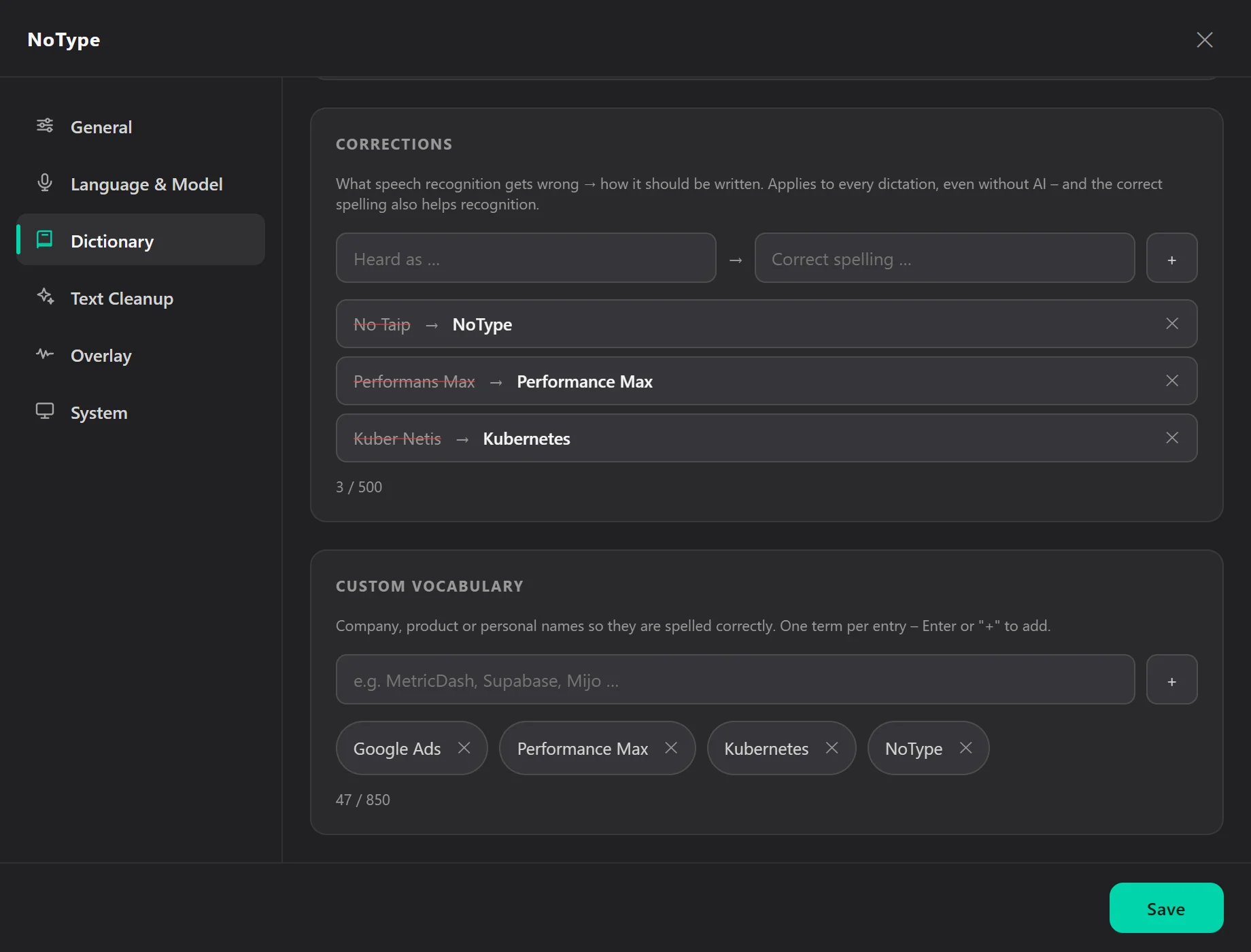
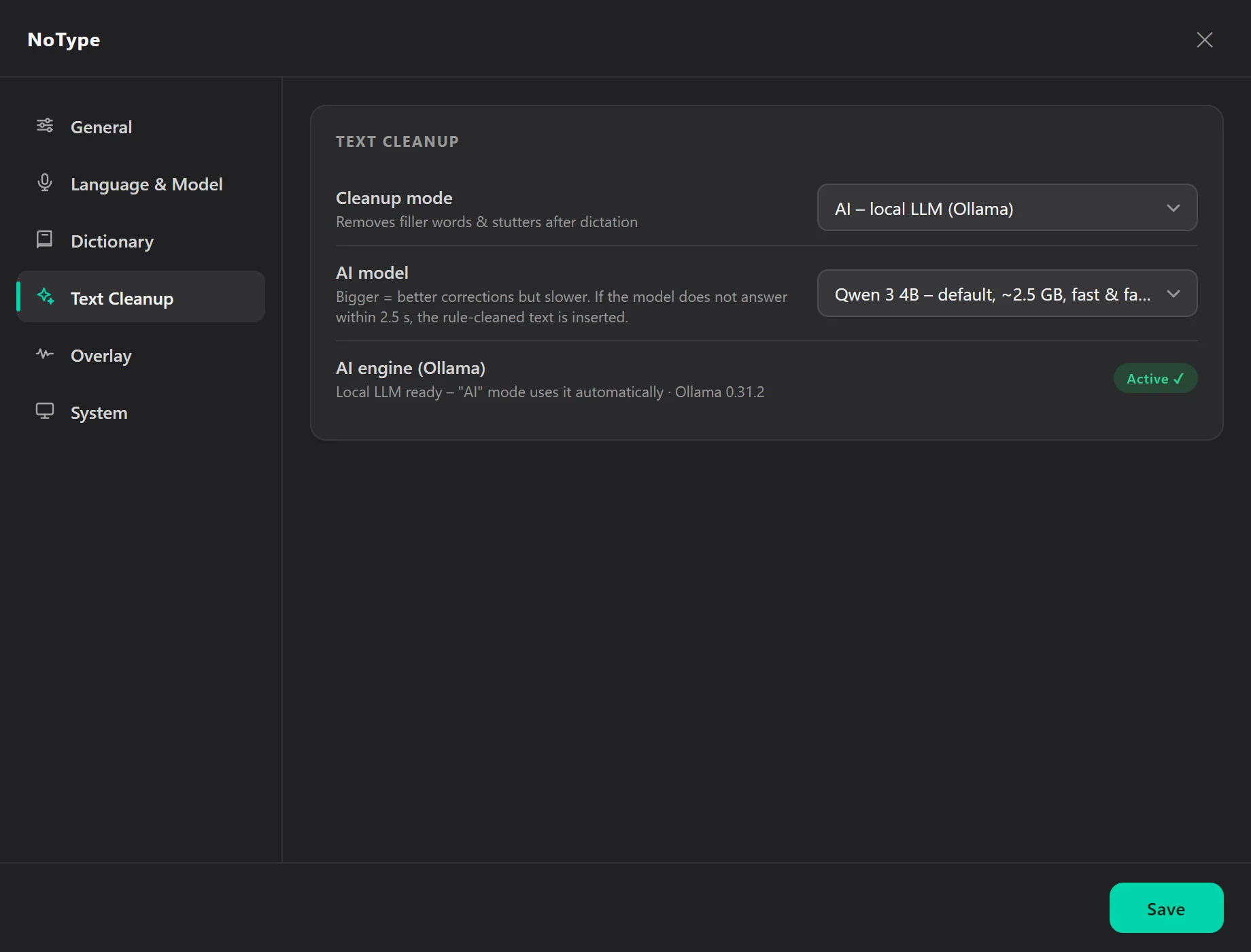
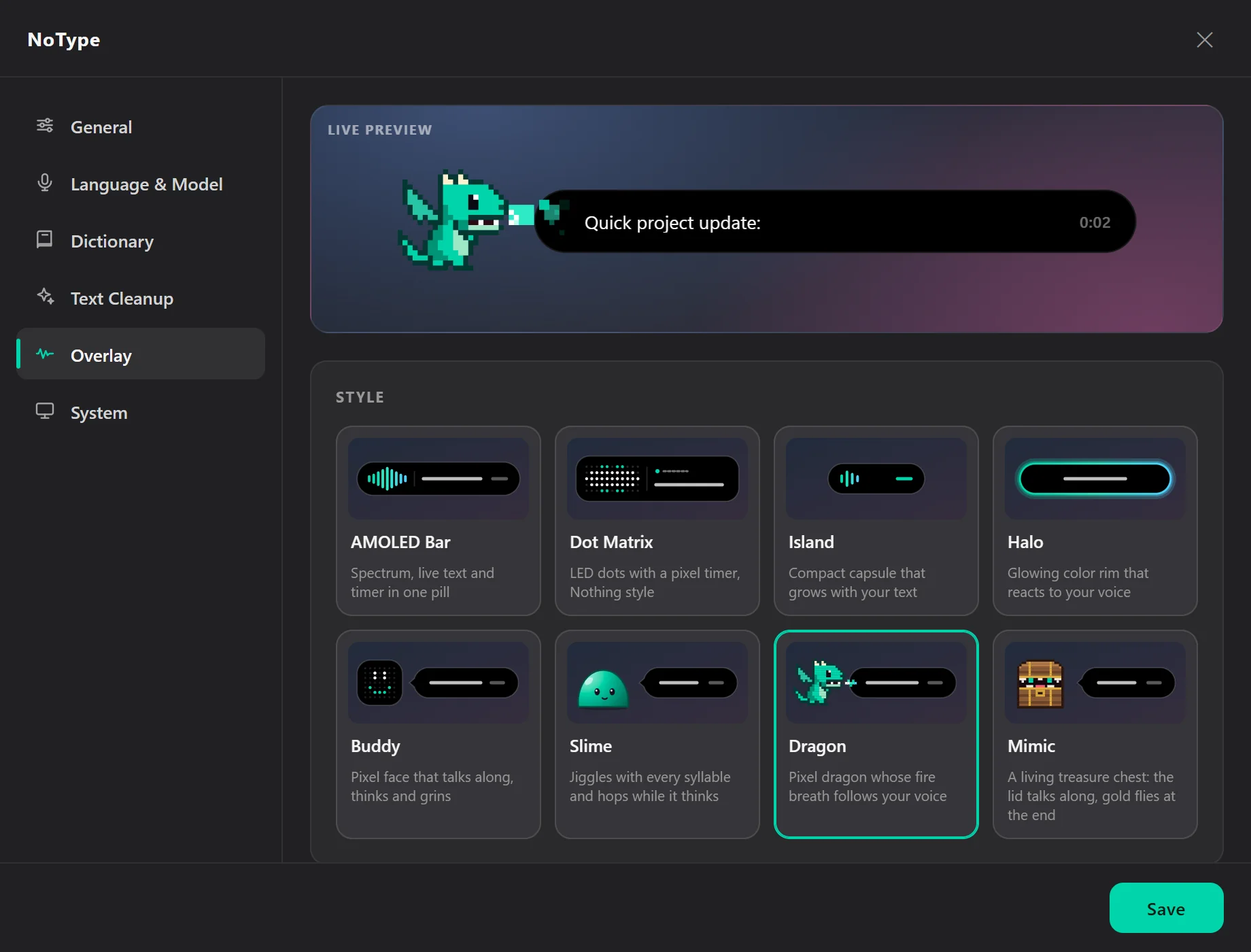
The app's real interface, with sample data
Speech models
Ten free models, one fits your computer
Bigger models are more accurate, especially with mixed languages and technical terms. The setup guide recommends a model for your hardware and downloads it once.
| Model | Languages | Download | VRAM | Best for |
|---|---|---|---|---|
| Whisper Tiny | 99 languages | 75 MB | 1 GB | very old machines and quick notes |
| Whisper Base | 99 languages | 145 MB | 1 GB | short sentences, good on laptops without an NVIDIA card |
| Whisper Small | 99 languages | 485 MB | 2 GB | solid all-round pick on the processor and older graphics cards |
| Whisper Medium | 99 languages | 1.5 GB | 5 GB | noticeably more accurate but slow, for mid-range graphics cards |
| Whisper Large v2 | 99 languages | 3.0 GB | 10 GB | languages where v2 invents less than v3 |
| Whisper Large v3 | 99 languages | 3.0 GB | 10 GB | maximum accuracy on high-end graphics cards |
| Whisper Large v3 TurboRecommended | 99 languages | 1.6 GB | 6 GB | near Large v3 quality in a fraction of the time, for any modern NVIDIA card |
| Distil Large v3 | English only | 1.5 GB | 3 GB | very fast English-only dictation |
| Distil Large v3.5 | English only | 1.5 GB | 3 GB | the best fast pick for English |
| Large v3 Turbo German | German only | 1.6 GB | 6 GB | pure German dictation with no English mixed in |
VRAM is the comfortable budget on the graphics card. Without an NVIDIA card, Small and Base run on the processor.
Why no Parakeet, Canary or Voxtral?
Before an engine goes into the catalog, I test it on real dictation. NVIDIA Parakeet TDT 0.6B is genuinely fast in my tests: about 60 ms per sentence against about 450 ms for Whisper Large v3 Turbo on the same graphics card. On German and mixed German and English dictation, though, it was at best as accurate as Whisper, and it cannot use a custom dictionary. With dictionary terms, Whisper made only about a fifth of the errors. Parakeet would also need a second CUDA runtime and about 4 GB more VRAM.
Canary 1B was slower and less accurate in my tests, with the same dictionary gap. Mistral's Voxtral has no practical local runtime on Windows yet. New engines get added as soon as they beat what NoType uses today.
Privacy
Your voice stays on your PC
Dictation, AI cleanup and command mode run fully offline. There is no telemetry of any kind.
NoType only goes online for models and updates, never with your voice
- the update check at startup and every 6 hours: NoType asks GitHub whether a new version is out. Like any website, GitHub sees your IP address, plus a random ID for your installation that is not tied to any account. You can switch the check off under Settings → General
- a new NoType version when you click “Update now”
- downloading the speech model you choose
- the optional AI engine
- AI engine updates when you click “Update”
Everything else stays local on your PC
- Settings
settings.json, with automatic backups- History and stats
history.json, the last 10 dictations- Diagnostic log
notype.log, rotating, for troubleshooting, never your dictated text- AI engine and model
ollama\, own subfolder- Speech models
huggingface\, default cache in your user folder
The first four live in %APPDATA%\NoType\, the speech models in %USERPROFILE%\.cache\huggingface\. Uninstalling removes the NoType folder, AI engine included, the autostart entry and the update cache in %LOCALAPPDATA%\notype-updater\, while an update keeps your settings. The speech models stay, because other apps may share that cache. If you need the space, delete the folders with “whisper” in their name there. For the portable version, delete its folder and %APPDATA%\NoType\ by hand.
To suggest corrections, NoType reads the field you dictated into for up to a minute afterwards and compares only the dictated part. It never reads password fields and keeps nothing unless you click “Learn”. You can switch this off under Settings → Dictionary.
By default NoType inserts text through the clipboard, and the dictated text stays there afterwards. If Windows clipboard history or sync across devices is on, it ends up there too. If you don’t want that, switch to “Always type” under Settings → System.
Download
Download NoType
Both versions are in the latest release on GitHub. No admin rights, no account.
Installer
For most peopleabout 1 GB
Run it, click through, done. Creates Start menu and desktop shortcuts and then keeps itself up to date with one click.
Portable ZIP
about 1.25 GB
For USB sticks, locked-down PCs or trying it out. Unzip, start NoType.exe, nothing gets installed. You swap in new versions by hand.
What you need
- Windows 11, 64-bit
- Ideally an NVIDIA graphics card from the GTX 10 series onwards with 6 GB of video memory or more. Without one, NoType runs on the processor with a smaller model.
- About 2 GB of disk space for the app, plus 0.1 to 3 GB for the speech model
Why so big? The download bundles NVIDIA's CUDA libraries. You don't have to install drivers, Python or anything else.
Windows warns you on first launch?
NoType is not code-signed, because a signature costs several hundred euros a year. That is why Windows SmartScreen shows “Windows protected your PC” on first launch.
- 1Click “More info”
- 2then “Run anyway”
For the ZIP, first right-click it, choose Properties, tick “Unblock”, then extract it.
Frequently asked questions
Is NoType really free?
Yes. No trial, no subscription, no account. The speech models are free as well and downloaded once.
Can I use NoType at work?
Yes, privately, at work, at school or anywhere else. You may not sell it, that is what the licence (MIT with Commons Clause) rules out.
Is NoType open source?
The complete source code is public on GitHub, so you can read it, audit it and build it yourself. The licence is MIT with Commons Clause: using and modifying it is allowed, selling it is not. That is why I call NoType source-available rather than open source in the OSI sense.
Where do my dictations end up?
Only on your PC, NoType never sends them to a server. The last 10 dictations and the daily stats live in %APPDATA%\NoType\, the diagnostic log contains no dictated text. Because NoType inserts through the clipboard, the latest text also sits there until you copy something else.
Do I need an internet connection?
Only once, to download the speech model and, if you want it, the AI engine. After that NoType works fully offline, loading the models included. When you are online it also looks for updates, and without a connection it simply skips the check.
Does NoType start with Windows?
If you want it to. “Start with Windows” is preselected in the last step of the setup guide, and later you switch it on or off under Settings → General or right in the tray menu. When it is on, NoType waits in the tray after you sign in and the shortcut works right away.
How do I get new versions?
The installed version tells you when a new one is out. Click “Update now” and NoType downloads it in the background, installs it and restarts, with your settings and dictionary kept. It never restarts in the middle of a dictation, and where it can, it downloads only the parts that changed. Nothing downloads without your click. You can also check yourself at any time with “Check for updates” in the tray menu. The portable version cannot replace itself, so its notice links to the download page. If you still have an older version without the update notice, run the new installer once by hand.
Does NoType work without an NVIDIA graphics card?
Yes, it then runs on your processor. Pick Small or Base in the setup guide. Results take a little longer but are still very usable.
Which languages does NoType understand?
The Whisper models recognise 99 languages, also mixed, for example German with English technical terms. The app's interface is available in English and German.
Is NoType available for macOS or Linux?
Not at the moment. NoType is built for Windows 11.
Why does Windows warn me on first launch?
NoType is not code-signed, because a signature costs several hundred euros a year. SmartScreen therefore warns about programs it does not know yet. Click “More info” and then “Run anyway”. You can review the source code on GitHub first.
For developers
Under the hood
A Python backend handles audio, speech recognition, text insertion and the AI engine. An Electron frontend takes care of the tray, overlay, settings and global shortcuts. The two talk JSON over stdin and stdout.
- WhisperSpeech recognition with faster-whisper (CTranslate2)
- CUDA 12GPU acceleration, automatic CPU fallback
- OllamaLocal AI with Qwen 3, Qwen 3.5 and Gemma 4
- ElectronTray, overlay and settings, no framework
- PythonAudio, inference and text insertion
- Win32Insertion via SendInput, learning via UI Automation