Google Ads Bidding Strategies: The Complete Guide 2026
Reality: In my experience, the right bidding strategy can improve performance significantly. Wrong strategy = burning money. This guide shows which strategy is optimal when.
Why Bidding Strategies Matter
Example: Same campaign, different strategies (made-up numbers):
Campaign with Manual CPC:
- Budget: €5,000/month
- Conversions: 50
- Cost per Conversion: €100
- ROAS: 300%

Same campaign with Target ROAS:
- Budget: €5,000/month
- Conversions: 83 (+66%!)
- Cost per Conversion: €60 (-40%!)
- ROAS: 485% (+62%!)
The difference: AI optimizes bids in real-time based on:
- Device (mobile vs. desktop)
- Location (Munich vs. rural)
- Time of day (10 AM vs. 3 AM)
- Browser
- User signals (remarketing list? Previous website visits?)
- Search query intent
- many other signals
Manually impossible!
The 9 Bidding Strategies Overview
1. Manual CPC
What: You set max CPC per keyword manually
Setup:
Campaign → Settings → Bidding Strategy
→ "Manual CPC"
→ (The former "Enhanced CPC" option is no longer available for Search and Display campaigns since March 2025)
Example:
Keyword "nike men's running shoes": Max CPC €2.50
Keyword "running shoes sale": Max CPC €1.80
Keyword "running shoes": Max CPC €1.20
When to use?
- Brand new campaign (0-30 conversions)
- Very small budget (<€500/month)
- Extremely niche keywords (little data for AI)
- Maximum control desired
Advantages:
- Full control over every cent
- Transparency (know exactly what happens)
- No learning phase
Disadvantages:
- Time-consuming (daily manual adjustments)
- Less efficient than AI (AI sees more signals)
- Scaling difficult
Optimal for: Start phase, testing, very small accounts
2. Enhanced CPC (eCPC), phased out in 2025
Status: Google phased out Enhanced CPC for Search and Display campaigns from March 2025. Campaigns that still had it enabled have bid like Manual CPC since then. I'm keeping this section because you'll still come across eCPC in older accounts, reports and guides.
What it was: Manual CPC + AI assistance (Google adjusted your max CPCs up or down per auction)
Setup:
No longer available for Search and Display campaigns (since March 2025)
How it worked (back then, example figures):
Your Max CPC: €2.00
Google sees: "This click has high conversion probability"
→ Bid: €2.60 (+30%)

Or: "This click has low probability"
→ Bid: €1.40 (-30%)
What it used to be used for:
- 30-100 conversions collected
- Transition phase to Smart Bidding
- Control + AI help desired
Advantages (back then):
- More control than Smart Bidding
- AI help with limited risk
- No learning phase (unlike full Smart Bidding)
Disadvantages (back then):
- Less efficient than full Smart Bidding
- Still manual effort
Today instead: Maximize Conversions (see no. 4) handles the transition from manual to Smart Bidding, later with a target CPA set.
3. Maximize Clicks
What: Google gets max clicks for your budget
Setup:
Bidding Strategy → "Maximize clicks"
→ Optional: Set max CPC limit (e.g., €3)
When to use?
- Goal: Traffic (not conversions!)
- Awareness campaigns
- Extremely low CPCs in niche
Advantages:
- Maximum traffic for budget
- Simple (no bid management)
Disadvantages:
- Ignores conversion quality!
- Often gets cheap but worthless clicks
- Not for direct response
Warning: Only use for awareness! For sales/leads: NOT recommended!
4. Maximize Conversions
What: Google gets max conversions for your budget (regardless of CPA)
Setup:
Bidding Strategy → "Maximize conversions"
How it works:
Budget: €1,000/day
Google bids aggressively for all conversion opportunities
→ Gets 50 conversions (CPA: €20)
Or: Gets 80 conversions (CPA: €12.50)
→ Whatever CPA, main thing max quantity!
When to use?
- From my practice: from around 30 conversions/month
- Goal: Volume (not efficiency)
- All conversions equally valuable
- Budget-limited (not CPA-limited)
Advantages:
- Maximum conversion volume
- Good for scaling
- Simple (no CPA target)
Disadvantages:
- No CPA goal → can get expensive!
- All conversions weighted equally (even bad leads)
- Needs enough budget (otherwise limited)
Optimal for: Lead-gen with high lead-to-customer rate, where volume > efficiency
5. Target CPA (Cost Per Acquisition)
What: Google optimizes to desired average cost per acquisition
Setup:
Bidding Strategy → "Target CPA"
→ Enter target CPA: €50
How it works:
Your goal: €50 CPA
Google bids:
- High for users with high conversion probability
- Low for low probability
Result: Average €50 CPA (individual can be €30 or €80)
When to use?
- From my practice: from around 30 conversions in 30 days (better 50+). According to Google, you can start Target CPA without any conversion history
- Goal: Efficiency (specific CPA)
- All conversions equally valuable
- Lead-gen (not e-commerce with different values)
Advantages:
- Predictable costs
- AI optimizes to CPA goal
- Good for budget planning
Disadvantages:
- Below around 30 conversions/month the AI has little data, in my experience
- Learning phase, in my experience usually 2-4 weeks (performance fluctuations)
- Can sacrifice volume for CPA goal
How to set Target CPA:
Method 1: Actual CPA of the last 30 days
Current: €60 CPA → Target: €60 (no markup)

Method 2: Break-Even CPA as ceiling
Customer Value: €200
Margin: 40% = €80
→ Target CPA: €60 (25% buffer)
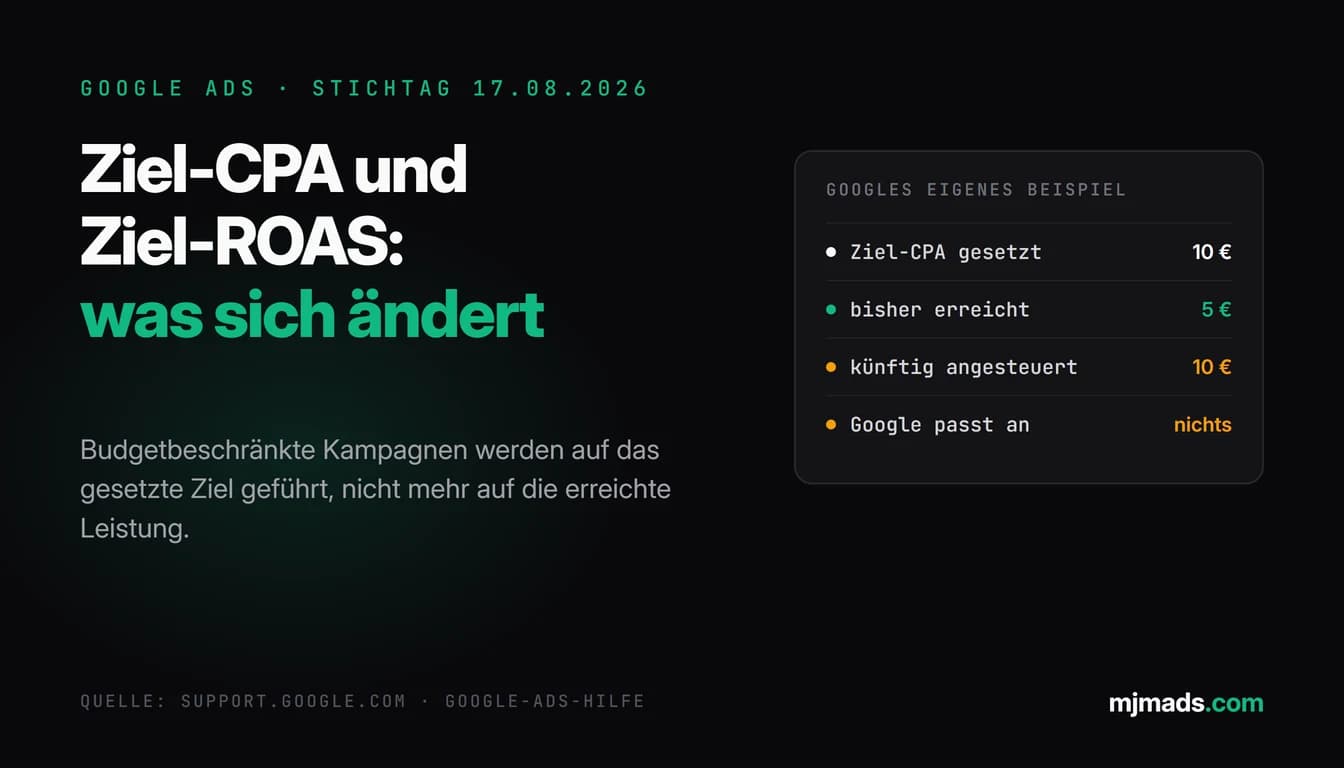
Important since August 2026: Between August 17 and 27, 2026, Google changed how target-based bidding behaves. According to Google, budget-constrained campaigns using Target CPA or Target ROAS (and Target CPC in Demand Gen) now deliver more consistently toward the set target instead of beating it. Google's example: Target CPA €10, actual CPA €5, the campaign now delivers closer to €10. A target with a markup, such as "historical CPA + 20%", can therefore pull your CPA up. For Target ROAS it works the other way round: a target below your actual ROAS can lower your ROAS. Google recommends aligning affected targets with recent performance using the bid target adjustment tool, and it does not adjust targets or budgets automatically (Google Ads Help). What I check in the account: Bidding Strategies: August 17, 2026 Key Date.
Optimal for: Lead-gen, SaaS trials, webinar signups
6. Target ROAS (Return on Ad Spend)
What: Google optimizes to desired return on ad spend
Setup:
Bidding Strategy → "Target ROAS"
→ Target ROAS: 400% (€1 spend = €4 revenue)
How it works:
Your goal: 400% ROAS
Google bids:
- High for users with high expected order value
- Low for low expected order value
Result: Average 400% ROAS
When to use?
- From my practice: from around 50 conversions/month (better 100+). Google itself requires at least 15 conversions in the past 30 days for Target ROAS in Search and Shopping campaigns
- E-commerce (different order values!)
- Conversion values are tracked
- Goal: Profitability (not just volume)
Advantages:
- Optimizes for revenue/profit (not just quantity)
- Better than CPA for e-commerce
- AI considers conversion values
Disadvantages:
- Needs many conversions in my experience (around 50/month)
- Learning phase, in my experience usually 2-4 weeks
- Needs correct conversion value tracking!
How to set Target ROAS:
Method: Calculate break-even ROAS

Costs: €10,000/month
Revenue: €40,000/month
→ Current ROAS: 400%

Margin: 40%
Break-Even: 1 / 0.4 = 250% ROAS

Set Target ROAS:
- Start: 400% (current ROAS, no discount)
- Optimized: 400-450%
- Aggressive (scaling): 300% (never below break-even)
Optimal for: E-commerce, different product values, in my experience from around 50 conv/month
7. Maximize Conversion Value
What: Google gets max conversion value (revenue) for budget (without ROAS goal)
Setup:
Bidding Strategy → "Maximize conversion value"
→ Optional: Set target ROAS (or leave empty)
When to use?
- From my practice: from around 100 conversions/month
- E-commerce with large catalog
- Enough budget (not budget-limited)
- Goal: Max revenue (efficiency secondary)
Advantages:
- Maximizes revenue
- Good for scaling
- Prefers high-value conversions
Disadvantages:
- No ROAS goal → can become inefficient
- Needs large budget
- Needs many conversions in my experience (100+/month)
Difference from Target ROAS:
Target ROAS: "Get revenue, but maintain ROAS at 400%"
Maximize Conv Value: "Get MAX revenue, whatever ROAS"
Optimal for: Scaling in e-commerce, when budget available
8. Target Impression Share
What: Ad appears in X% of possible impressions at a chosen location on the results page (anywhere, top or absolute top)
Setup:
Bidding Strategy → "Target impression share"
→ Target: 80% impression share
→ Ad location: "Absolute top" (the first ad among top ads)
→ Max CPC limit: €5
When to use?
- Brand protection (own brand)
- Displace competition (competitive keywords)
- Awareness campaigns (visibility more important than ROI)
Advantages:
- High, predictable visibility (as a target, not guaranteed)
- Displace competition
- Good for brand keywords
Disadvantages:
- Expensive! (often bids over value)
- Ignores conversions/ROI
- Only for special use cases
Example:
Brand keyword: "[Your brand] shoes"
Competitor bids on your brand
→ Target Impression Share 90% at "Absolute top" (first of the top ads)
→ You usually appear above the competitor
Optimal for: Brand protection, not for direct response
9. Viewable CPM (vCPM)
What: Pay-per-1000-viewable-impressions (display/video only)
Setup:
Display Campaign → vCPM
→ Max vCPM: €2
When to use?
- Awareness (not direct response!)
- Display/YouTube campaigns
- Retargeting (brand awareness)
Optimal for: Display/video awareness, not for Search
Smart Bidding: Decision Matrix
Which Smart Bidding strategy when?
| Situation | Conversions/Month | Goal | Recommended Strategy |
|---|---|---|---|
| Start (new) | 0-30 | Collect data | Manual CPC |
| Growth | 30-50 | Transition to Smart Bidding | Maximize Conversions (formerly Enhanced CPC) |
| Established | 50-100 | Leads (same value) | Target CPA |
| Established | 50-100 | E-commerce | Target ROAS |
| Scaling | 100-500 | Max volume | Maximize Conversions |
| Scaling | 500+ | Max revenue | Maximize Conversion Value |
| Brand | Any | Visibility | Target Impression Share |
Table scrolls sideways
By business type:
Lead-Gen (B2B/B2C):
0-30 Conv: Manual CPC
30-50 Conv: Maximize Conversions (transition)
50+ Conv: Target CPA
→ If lead values differ: Target ROAS (with lead values)
E-Commerce:
0-50 Conv: Manual CPC or Maximize Conversions
50-100 Conv: Target ROAS (above break-even: 1 / margin)
100+ Conv: Maximize Conversion Value or Target ROAS
SaaS/Subscriptions:
0-30 Trials: Manual CPC
30-50 Trials: Maximize Conversions (transition)
50+ Trials: Target CPA
→ Advanced: Target ROAS (with Customer Lifetime Value as conversion value)
Whether your current bid strategy fits your conversion volume is one of the areas I check in the Google Ads audit.
Portfolio Bidding Strategies
What: One bidding strategy across multiple campaigns
Setup:
Tools → Budgets and bidding → Bid strategies → +
→ e.g., "Target ROAS 400%"
→ Assign multiple campaigns
Advantages:
- AI learns across campaigns (more data!)
- Central management (one goal for all)
- Better performance (cross-campaign optimization)
When to use?
- From my practice: from 2-3 similar campaigns
- Same goal (e.g., all €50 CPA)
- From my practice: around 50 conversions total/month
Example:
Portfolio: "Lead-Gen Target CPA €50"
→ Campaign 1: "Search - Brand" (15 conv/month)
→ Campaign 2: "Search - Generic" (20 conv/month)
→ Campaign 3: "Search - Competitor" (18 conv/month)
→ Total: 53 conv/month → enough data for AI!
Understanding the Learning Phase
Reality: Smart Bidding needs learning phase!
Learning phase duration (rules of thumb from my practice; according to Google, the learning period usually takes about 50 conversion events or 3 conversion cycles):
Target CPA / Target ROAS: 2-4 weeks
Maximize Conversions: 1-2 weeks
Manual CPC: No learning phase (active immediately)
What happens in learning phase? (typical course from my practice)
Week 1:
- Google collects data
- Performance unstable (CPA fluctuates 30-50%)
- Conversions can drop

Week 2-3:
- AI learns patterns
- Performance stabilizes
- CPA approaches goal

Week 4+:
- Fully learned
- Stable performance
- CPA in target range (±20%)
Important during learning phase:
- ❌ DON'T: Switch bidding strategy (reset!)
- ❌ DON'T: Change target CPA/ROAS daily (confuses AI)
- ❌ DON'T: Drastically change budget (in my experience ±20% is usually fine, big jumps often throw performance off)
- ✅ Be patient (min. 2-4 weeks wait)
- ✅ Only fix major problems
Check learning phase status:
Tools → Budgets and bidding → Bid strategies → "Status" column
"Learning" = the strategy is adjusting after a change
"Active" = the strategy is optimizing normally, no changes needed
"Limited" = e.g. constrained by search volume, bid limits or budget
Switching Bidding Strategies (correctly!)
Problem: Wrong switch = learning phase reset = 2-4 weeks poor performance!
When to switch?
- After min. 4-6 weeks in current strategy
- If clear performance problems (CPA +50% over goal consistently)
- If enough data for new strategy (conversions/month)
Switch roadmap:
Phase 1: Manual → Maximize Conversions (after 30 conversions; Enhanced CPC used to be the in-between step here):
1. Switch to Maximize Conversions (no target CPA yet)
2. Keep the budget stable
3. Run 2 weeks (learning phase!)
4. Observe (no big changes!)
Phase 2: Maximize Conversions → Target CPA (after 50 conversions):
1. Calculate historical CPA (last 30 days)
2. Set Target CPA = Hist. CPA (no markup, see the August 2026 note)
3. Switch to Target CPA
4. 4 weeks patience (learning phase!)
5. After 4 weeks: Adjust goal (lower if possible)
Phase 3: Target CPA → Target ROAS (e-commerce, 100+ conv):
1. Ensure conversion value tracking!
2. Calculate historical ROAS
3. Target ROAS = Hist. ROAS (no discount, see the August 2026 note)
4. Switch
5. Wait 4 weeks
Important: Never test multiple strategies in short time! Every switch = reset!
Whether the new strategy really performs better is something you can test against the original in a Google Ads experiment before switching completely.
Bid Adjustments
What: Manual +/- % on bids based on signals
Available for: Manual CPC and Maximize Clicks (formerly also Enhanced CPC). With Smart Bidding (Target CPA, Target ROAS, Maximize Conversions, Maximize Conversion Value), Google's help says manual bid adjustments aren't supported. Exceptions: a -100% device adjustment (excluding a device) works with all automated strategies, and with Target CPA a device adjustment changes the CPA target for that device rather than the bid. With Target Impression Share, too, only -100% on devices is possible.
Most important adjustments:
1. Device:
Google Ads → Campaign → Devices
Mobile: +40% (if mobile performs better)
Desktop: +0% (baseline)
Tablet: -30%
2. Location:
Campaign → Locations → Adjust bids
Munich: +50% (high conversion rate)
Berlin: +20%
Rural: -40%
3. Audiences (remarketing):
Campaign → Audiences
Cart abandoners: +200% (very high intent!)
Website visitors: +100%
No remarketing: +0%
4. Time:
Campaign → Ad scheduling
Mon-Fri 9am-6pm: +30% (office hours, high performance)
Mon-Fri 6pm-9am: -50%
Sat-Sun: -30%
5. Demographics (age/gender):
Campaign → Demographics
25-34 years: +40% (best performance)
65+ years: -60%
Male: +20%
Important: Adjustments multiply!
Example:
Base bid: €2
Mobile (+40%): €2.80
Munich (+50%): €4.20
Remarketing (+200%): €12.60
→ Final bid: €12.60
Common Bidding Strategy Mistakes
Mistake 1: Smart Bidding too early
❌ Problem: Target CPA with 10 conversions/month ✅ Solution: Wait for min. 30 conversions
Mistake 2: Set unrealistic goal
❌ Problem: Historical €80 CPA, set goal to €40 CPA (too aggressive!) → Google doesn't find enough conversions → Campaign dies ✅ Solution: Target CPA max. 20% lower than historical
Mistake 3: Interrupt learning phase
❌ Problem: After 3 days "performance bad" → switch strategy → Reset, new learning phase ✅ Solution: Wait min. 4 weeks!
Mistake 4: Budget too low for Smart Bidding
❌ Problem: Target ROAS with €10/day budget → Too little spend for AI optimization ✅ Solution: From my practice, at least €30-50/day for Smart Bidding
Mistake 5: Wrong conversion tracking
❌ Problem: Smart Bidding without correct tracking → AI optimizes to wrong data! ✅ Solution: Conversion tracking MUST be correct (incl. values for ROAS!)
Mistake 6: Change goals daily
❌ Problem: Monday €50 CPA, Wednesday €60 CPA, Friday €55 CPA → AI confused, can't learn ✅ Solution: Change goal max. 1x per 2 weeks
Advanced: Custom Bidding Strategies
For large accounts (enterprise):
1. Seasonality adjustments:
Tools → Budgets and bidding → Adjustments → Seasonal
→ Example value from my practice: Black Friday, expected conversion rate +150% (3 days)
→ Derive the value from your own previous-year data
→ Google adjusts bids accordingly
2. Data-driven attribution:
Goals → Summary → conversion action → Attribution model: "Data-driven"
→ Smart Bidding uses better attribution
→ in my experience often noticeably better performance
3. Value rules:
Different conversion values by:
- New customers (€100 value)
- Existing customers (€50 value)
→ Smart Bidding optimizes accordingly
Conclusion
Bidding strategy = core of Google Ads performance
Recommended roadmap:
Month 1 (start):
- Manual CPC
- Collect data
- Testing
Month 2 (30+ conversions):
- Maximize Conversions (formerly Enhanced CPC)
- First AI help
- Continue optimizing
Month 3-4 (50+ conversions):
- Target CPA (lead-gen)
- Target ROAS (e-commerce)
- Complete learning phase
Month 5+ (100+ conversions):
- Optimize goals (lower CPA, increase ROAS)
- Portfolio strategies
- Scaling
Most important rule: Patience! Smart Bidding needs time + data!
FAQ: Google Ads Bidding Strategies
Which bidding strategy is best for Google Ads?
Depends on conversions/month and goal: 0-30 conversions: Manual CPC (collect data). 30-50 conversions: Maximize Conversions (transition, Enhanced CPC was phased out in March 2025). 50+ conversions: Target CPA for lead-gen (all leads equally valuable) OR Target ROAS for e-commerce (different order values). 100+ conversions: Maximize Conversion Value (scaling). Rule of thumb: More conversions = use more AI. Fewer conversions = more manual control.
When should I use Smart Bidding?
Sensible prerequisites for Smart Bidding (Target CPA/ROAS) from my practice, not a Google requirement: 1) Around 30-50 conversions/month (better: 50+), 2) Around EUR 500-1,000 budget/month, 3) Correct conversion tracking (incl. values for ROAS!), 4) Patience for 2-4 weeks learning phase. Too early = bad (too little data → AI can't learn). Too late = wasted performance (manual less efficient). Optimal: Switch to Target CPA/ROAS from 50 conversions/month.
What's the difference between Target CPA and Target ROAS?
Target CPA = optimizes for cost per acquisition (€X per lead/purchase). Best for: Lead-gen, SaaS trials, all conversions equally valuable. Example: Target €50 CPA → Google gets leads for average €50. Target ROAS = optimizes for return on ad spend (€Y revenue per €1 spend). Best for: E-commerce, different order values. Example: Target 400% ROAS → €1 spend brings €4 revenue. Rule: All conversions equal → CPA. Different values → ROAS.
How long is the learning phase for Smart Bidding?
Learning phase duration from my practice (according to Google it depends on conversion volume and conversion cycle): Target CPA/Target ROAS: 2-4 weeks. Maximize Conversions: 1-2 weeks. Maximize Conversion Value: 2-3 weeks. During learning phase: Performance unstable (CPA fluctuates ±30-50%), conversions can temporarily drop, DON'T switch strategy (reset!), DON'T change goal daily. After 4 weeks: Stable performance, CPA/ROAS in target range (±20%). Important: Patience! Don't give up after 1 week.
How do I set the right Target CPA/ROAS?
Set Target CPA: Method 1: Actual CPA of the last 30 days. Current €60 → Target €60. I no longer add a markup like +20%: since August 2026, budget-constrained campaigns deliver closer to the set target according to Google, so a higher target can pull your CPA up. Method 2: Break-even CPA as ceiling. Customer value €200, margin 40% → €80 profit → Target CPA €60 (buffer). Set Target ROAS: Break-even ROAS = 1 / margin. Margin 40% → Min. 250% ROAS (break-even). Start: current ROAS, never below break-even. After 4-6 weeks: Optimize (lower for more volume, increase for more efficiency). Important: Not too aggressive (campaign dies)!
Can I use bid adjustments with Smart Bidding?
Mostly no. According to Google's help, manual bid adjustments aren't supported with Smart Bidding (Target CPA, Target ROAS, Maximize Conversions, Maximize Conversion Value); these strategies factor in signals like device, location, time and audience on their own. Exceptions: a -100% device adjustment (excluding a device) works with all automated strategies, and with Target CPA a device adjustment changes the CPA target for that device rather than the bid. Smart Bidding still respects your ad schedule, just not percentage time adjustments. Audience adjustments (including remarketing/RLSA) aren't used by Smart Bidding either. Manual CPC and Maximize Clicks: adjustments work.
What do I do if Smart Bidding doesn't work?
5 checks: 1) Enough data? In my experience around 30-50 conv/month. 2) Learning phase complete? Min. 4 weeks wait! 3) Goal realistic? Not too aggressive (max. -20% from historical CPA/ROAS). 4) Budget sufficient? In my experience at least €30-50/day for Smart Bidding. 5) Conversion tracking correct? Wrong data = wrong optimization! If still bad after 6-8 weeks: Back to Maximize Conversions without a target or Manual, collect more data, retry later.
Should I use portfolio bidding strategies?
Portfolio strategies = one bidding strategy across multiple campaigns. Use when: 1) 2-3+ similar campaigns (same goal), 2) Individually too few conversions (<30/month), but together enough (50+), 3) Central management desired. Advantage: AI learns across campaigns (more data!), better performance. Example: 3 campaigns with 20 conv/month each (individually too little) → Portfolio with 60 conv total (enough!). Setup: Tools → Budgets and bidding → Bid strategies → + (portfolio bid strategy).